Complementary
Two colors from opposite sides of the wheel. They make each other look more vivid, which is why the pairing is used for anything that needs to stand out.
Yellow green is the hex color #9ACD32, with RGB values 154, 205, 50. It is a CSS color keyword, so browsers render it from the name alone, and its value is fixed by the CSS Color Module.
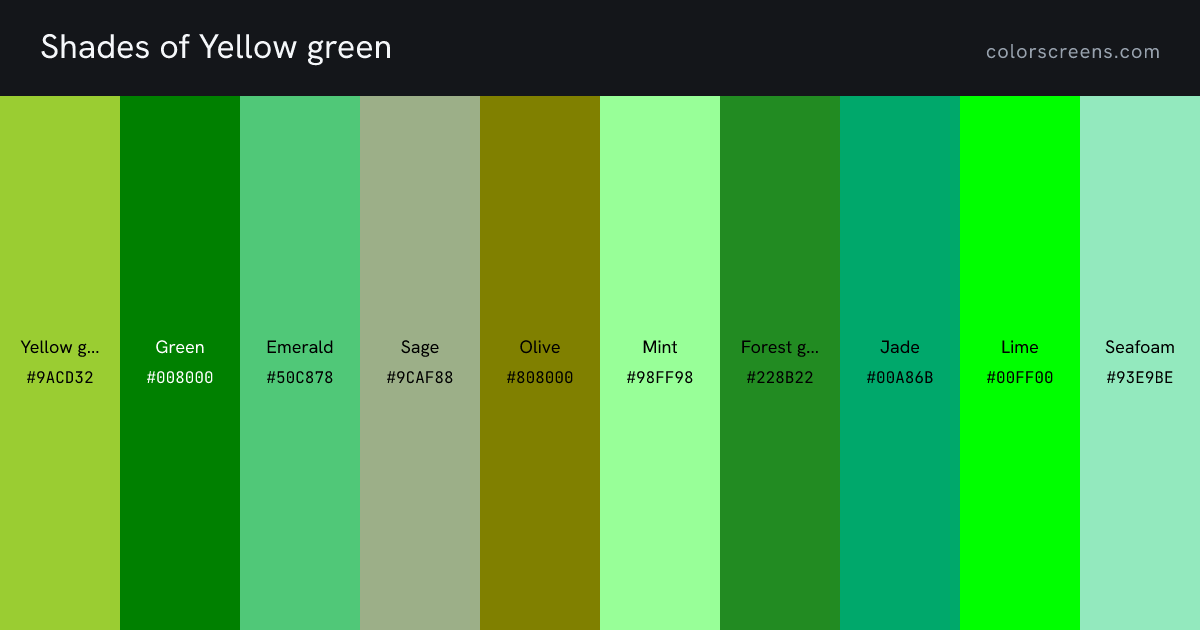
Every swatch on this page, as one image you can save or share.
Every value for #9ACD32, ready to paste. Click any code to copy it.
| Channel | Decimal | Share | Hex | Octal | Binary |
|---|---|---|---|---|---|
| Red | 154 | 60.39% | 9A | 232 | 10011010 |
| Green | 205 | 80.39% | CD | 315 | 11001101 |
| Blue | 50 | 19.61% | 32 | 62 | 00110010 |
The nearest web-safe color is #99CC33, from the 216-color palette browsers agreed on before displays could be trusted with more.
Every step is generated from #9ACD32. Click a swatch to copy its hex.
A shade is the base color with black mixed in. Shades read as deeper and more dramatic, and they are what you reach for when a color needs to recede or carry weight.
A tint is the base color with white mixed in. Tints turn pastel as they lighten, which makes them useful for backgrounds and for anything that has to sit behind text.
A tone is the base color with gray mixed in. Tones lose the shout without losing the hue, and they are usually what separates a considered palette from a loud one.
The same color as the 50 to 950 ladder every CSS framework uses, with #9ACD32 at 500. Click a step to copy its hex, or take the whole scale as variables for a design system.
Yellow green sits in the green family. Every named green in the library, with yellow green first.
| Swatch | Name | Hex | RGB | HSL |
|---|---|---|---|---|
| is a CSS keyword is the color on this page | #9ACD32 | 154, 205, 50 | 80, 61%, 50% | |
| Green is a CSS keyword | #008000 | 0, 128, 0 | 120, 100%, 25% | |
| Emerald | #50C878 | 80, 200, 120 | 140, 52%, 55% | |
| Sage | #9CAF88 | 156, 175, 136 | 89, 20%, 61% | |
| Olive is a CSS keyword | #808000 | 128, 128, 0 | 60, 100%, 25% | |
| Mint | #98FF98 | 152, 255, 152 | 120, 100%, 80% | |
| Forest green is a CSS keyword | #228B22 | 34, 139, 34 | 120, 61%, 34% | |
| Jade | #00A86B | 0, 168, 107 | 158, 100%, 33% | |
| Lime is a CSS keyword | #00FF00 | 0, 255, 0 | 120, 100%, 50% | |
| Seafoam | #93E9BE | 147, 233, 190 | 150, 66%, 75% | |
| Moss | #8A9A5B | 138, 154, 91 | 75, 26%, 48% | |
| Chartreuse is a CSS keyword | #7FFF00 | 127, 255, 0 | 90, 100%, 50% | |
| Sea green is a CSS keyword | #2E8B57 | 46, 139, 87 | 146, 50%, 36% | |
| Olive drab is a CSS keyword | #6B8E23 | 107, 142, 35 | 80, 60%, 35% | |
| Hunter green | #355E3B | 53, 94, 59 | 129, 28%, 29% | |
| Pistachio | #93C572 | 147, 197, 114 | 96, 42%, 61% | |
| Dark green is a CSS keyword | #006400 | 0, 100, 0 | 120, 100%, 20% | |
| Light green is a CSS keyword | #90EE90 | 144, 238, 144 | 120, 73%, 75% | |
| Spring green is a CSS keyword | #00FF7F | 0, 255, 127 | 150, 100%, 50% | |
| Medium spring green is a CSS keyword | #00FA9A | 0, 250, 154 | 157, 100%, 49% | |
| Lime green is a CSS keyword | #32CD32 | 50, 205, 50 | 120, 61%, 50% | |
| Green yellow is a CSS keyword | #ADFF2F | 173, 255, 47 | 84, 100%, 59% |
Harmonies are positions on the color wheel rather than matters of taste, which is why they keep working across very different designs.
Two colors from opposite sides of the wheel. They make each other look more vivid, which is why the pairing is used for anything that needs to stand out.
Three neighbors on the wheel. Nothing competes, so the result reads calm and settled, closer to how color behaves in nature.
The base plus the two colors either side of its complement. It keeps most of the contrast while being much easier to balance.
Three colors spaced evenly around the wheel. Strong and lively, and usually best with one dominant color and two accents.
Two complementary pairs, forming a rectangle on the wheel. The richest scheme available, and the hardest to keep from shouting.
One hue at different lightness levels. Effortlessly cohesive, and the safest way to build a palette around a brand color.
Near neighbors, for when this color is almost right. Each one shifts hue, saturation or lightness by a small step.
Five-color palettes built around #9ACD32, each following a different scheme. Click any swatch to copy it, or open the generator to build your own.
Open the palette generator to lock the colors you like and regenerate the rest.
5 ready-made green gradients, each with every stop written as a hex you can edit.
Whether yellow green works as text, and what to put on top of it when it is the background. Ratios follow WCAG 2.1, where 4.5 is the bar for body text and 3 for large text.
Large text at 24 pixels
Body text at 16 pixels. A flat field of color removes every variable, which is what makes it useful for judging a display.
Large text at 24 pixels
Body text at 16 pixels. A flat field of color removes every variable, which is what makes it useful for judging a display.
Used the other way round, #9ACD32 as a background takes #000000 text. That is the higher-contrast of the two, and it is what the tool picks automatically for any chrome sitting on your color.
Yellow green reads better on a black background of the two. Contrast is a property of the pair, not of one color, so a color that fails here can still be perfectly usable against a different partner.
Half of the most confused pair in the keyword set. Yellowgreen and greenyellow sit four degrees apart in hue, 80 against 84, so the names are not describing the difference anyone can see. This is the muted one, at 61 percent saturation against the other's 100.