Microsoft brand colors
Microsoft publishes no color values. The Windows trademark guidelines run to a hundred pages on what may not be done to the logo without stating what color it is, and there is no design system page or press kit that fills the gap. So the four squares below are measured from the reference artwork rather than specified, and two versions of that artwork disagree slightly, which is why both are shown.
Palette image
Every swatch on this page, as one image you can save or share.
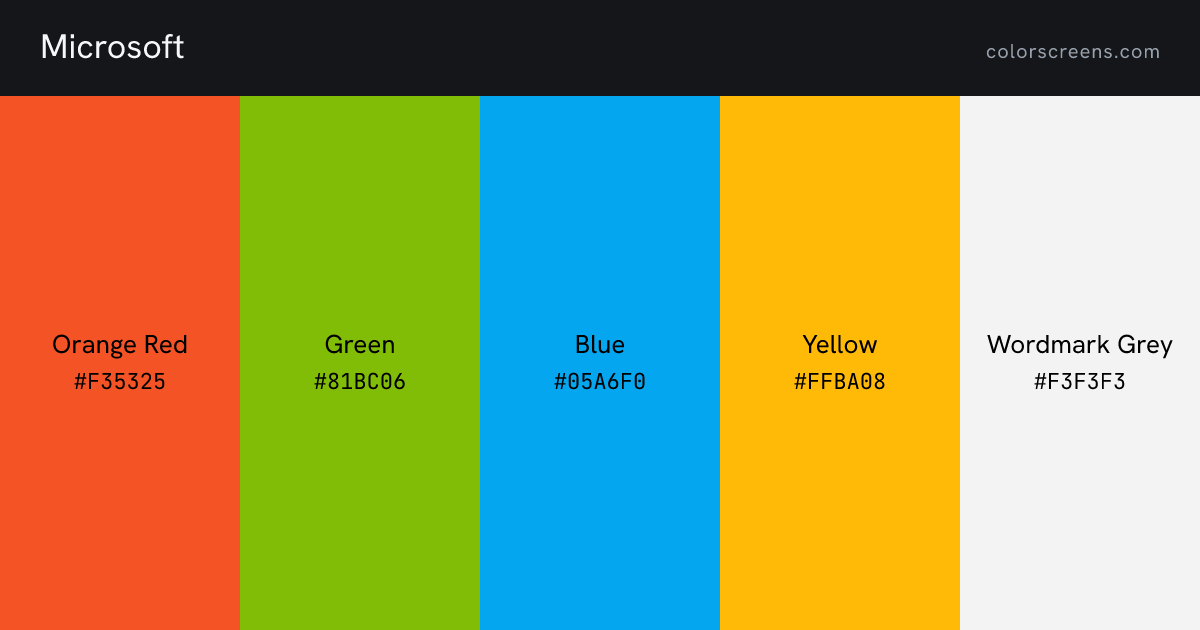
Every color
| Color | Role | Hex | RGB | HSL | Pantone | CMYK | Preview |
|---|---|---|---|---|---|---|---|
| Orange Red | primary | #F35325 | 243, 83, 37 | 13, 90%, 55% | -- | -- | Fill screen |
| Green | secondary | #81BC06 | 129, 188, 6 | 79, 94%, 38% | -- | -- | Fill screen |
| Blue | secondary | #05A6F0 | 5, 166, 240 | 199, 96%, 48% | -- | -- | Fill screen |
| Yellow | accent | #FFBA08 | 255, 186, 8 | 43, 100%, 52% | -- | -- | Fill screen |
| Wordmark Grey | neutral dark | #F3F3F3 | 243, 243, 243 | 0, 0%, 95% | -- | -- | Fill screen |
Microsoft against your project
Contrast pairs
Orange Red passes AA for body text on black, at 6.1 to 1.
Of 42 ordered pairs in this palette, 12 clear 4.5 to 1 for body text and 16 clear 3 to 1 for large text. Row is the text color, column is the background.
| Text color | Orange Red | Green | Blue | Yellow | Wordmark Grey | White | Black |
|---|---|---|---|---|---|---|---|
| Orange Red | 1.5Orange Red on Green, fails AA for body text | 1.3Orange Red on Blue, fails AA for body text | 2.0Orange Red on Yellow, fails AA for body text | 3.1Orange Red on Wordmark Grey, fails AA for body text | 3.5Orange Red on White, fails AA for body text | 6.1Orange Red on Black, passes AA for body text | |
| Green | 1.5Green on Orange Red, fails AA for body text | 1.2Green on Blue, fails AA for body text | 1.4Green on Yellow, fails AA for body text | 2.1Green on Wordmark Grey, fails AA for body text | 2.3Green on White, fails AA for body text | 9.1Green on Black, passes AA for body text | |
| Blue | 1.3Blue on Orange Red, fails AA for body text | 1.2Blue on Green, fails AA for body text | 1.6Blue on Yellow, fails AA for body text | 2.5Blue on Wordmark Grey, fails AA for body text | 2.7Blue on White, fails AA for body text | 7.7Blue on Black, passes AA for body text | |
| Yellow | 2.0Yellow on Orange Red, fails AA for body text | 1.4Yellow on Green, fails AA for body text | 1.6Yellow on Blue, fails AA for body text | 1.5Yellow on Wordmark Grey, fails AA for body text | 1.7Yellow on White, fails AA for body text | 12.3Yellow on Black, passes AA for body text | |
| Wordmark Grey | 3.1Wordmark Grey on Orange Red, fails AA for body text | 2.1Wordmark Grey on Green, fails AA for body text | 2.5Wordmark Grey on Blue, fails AA for body text | 1.5Wordmark Grey on Yellow, fails AA for body text | 1.1Wordmark Grey on White, fails AA for body text | 18.9Wordmark Grey on Black, passes AA for body text | |
| White | 3.5White on Orange Red, fails AA for body text | 2.3White on Green, fails AA for body text | 2.7White on Blue, fails AA for body text | 1.7White on Yellow, fails AA for body text | 1.1White on Wordmark Grey, fails AA for body text | 21.0White on Black, passes AA for body text | |
| Black | 6.1Black on Orange Red, passes AA for body text | 9.1Black on Green, passes AA for body text | 7.7Black on Blue, passes AA for body text | 12.3Black on Yellow, passes AA for body text | 18.9Black on Wordmark Grey, passes AA for body text | 21.0Black on White, passes AA for body text |
Other values you will see
The palette above is what Microsoft publishes. Below is what you will actually meet elsewhere, and where the two part company it is worth knowing which one you are looking at.
The 2012 identity artwork
Commons holds a second file named for the 2012 logo. Every square differs by a few points per channel, and the wordmark is dark rather than light. This is the set repeated by most color aggregators.
- Orange Red#F25022
- Green#7FBA00
- Blue#00A4EF
- Yellow#FFB900
- Wordmark Grey#737373
An area measurement of the reference artwork, retrieved 2026-08-03
.svg)
Sources
- The palette above: https://commons.wikimedia.org/wiki/File:Microsoft_logo.svg
